
Frequently Asked Questions (FAQ)

How do I download Designs for Pages app?


Designs for Pages app is available in Mac App Store. Click here to download Designs for Pages app from Mac App Store. Download will start automatically by tapping install app in Mac App Store. Once downloaded the app will be located in your Mac's Applications folder. Check for "Designs for Pages” app in the Applications folder, through the Launchpad or in the Spotlight.

Can I have this app on my second computer?


Yes. You can use the app on up to 5 Macs using the same Apple ID. Just run the App Store app with the same Apple ID on the second Mac and go to the Purchases tab. You'll see a list of the apps you've already purchased, with an Install button next to each one - click the button to install on the second Mac.

I have changed computer and In-App purchases aren't showing up as a purchased anymore. How to restore purchases?
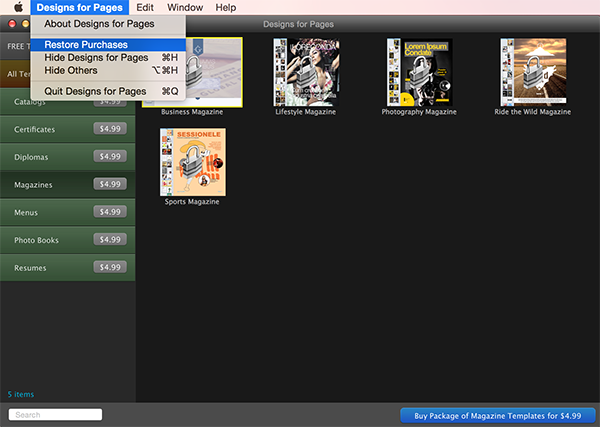

You can re-download any in-app purchase for free using the same Apple ID. Sign in with the Apple ID, open the app window and wait until all the prices will be loaded on the buttons. Click the app name and select "Restore Purchases" from the top menu. The download process will begin for all the in-app purchases you have purchased earlier. Of course they will be downloaded for free. You can see that in the picture below:


My in-app purchase download was interrupted. How to resume downloading?


Designs for Pages app contains high quality templates inside and all these files size is about 300 MB. Due to this it can take some time depending on your internet speed to download all categories. If the downloading process was interrupted because of the internet connection problems, the download starts from the beginning after the app is re-opened.

The apps with the in-app purchases work different and require more patience to download and work with them. It is just different type apps. They are strongly related with the internet connection and server system. Wait until the download will be finished without interruptions and you will be able to create awesome documents.

If download is taking too long then you can try to download the templates during the night or in some time when your internet provider’s traffic is lower you can use wi-fi or some faster internet connection at your work or friend’s house.